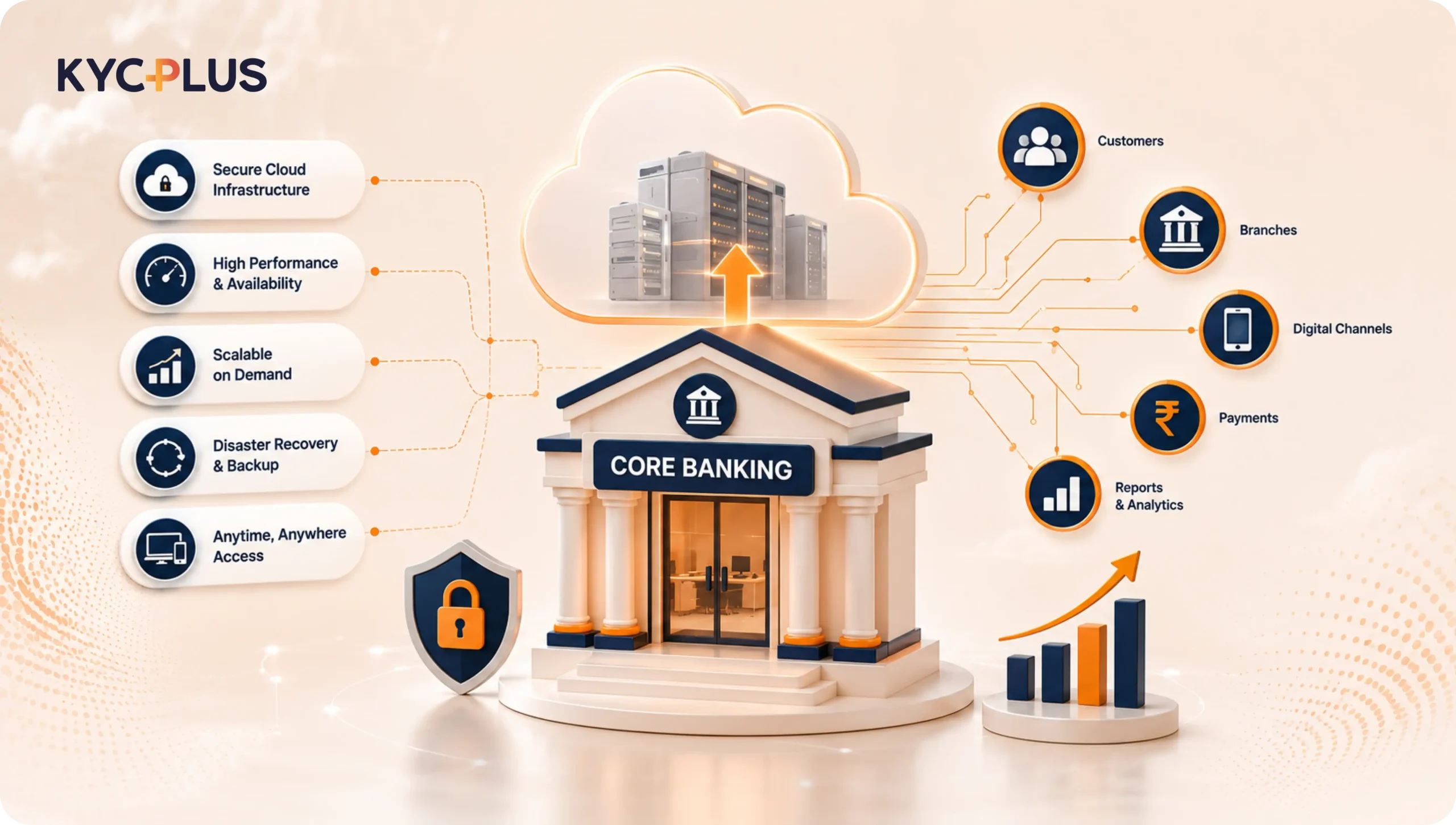
The banking industry is moving rapidly toward digital, connected, and technology-driven operations. Customers expect faster services, digital access, secure transactions, and convenient onboarding, while banks need technology that can support growing transaction volumes, multiple branches, regulatory requirements, and changing customer expectations. At the center of most banking operations is the Core Banking System (CBS), which manages essential functions such as customer accounts, deposits, loans, transactions, interest calculations, accounting, and branch operations. As banks modernize their infrastructure, Cloud CBS Software for Banks is becoming an increasingly important option.
Traditional core banking environments often require banks to maintain servers, storage, networking infrastructure, backup systems, and other technology resources. This can involve significant capital investment as well as ongoing maintenance and technical expertise. Cloud-based technology provides an alternative approach by allowing core banking applications to operate through cloud infrastructure, depending on the deployment model selected by the institution.
However, moving to the cloud should not be treated as simply changing where software is hosted. A bank needs to evaluate security, scalability, performance, integration, data management, disaster recovery, compliance, migration, support, and overall cost before choosing a solution.
This is particularly important for cooperative banks, Urban Cooperative Banks (UCBs), District Central Cooperative Banks (DCCBs), and other financial institutions that need to balance modernization with operational efficiency and cost management.
So, what should a bank actually look for before choosing Cloud CBS Software for Banks? The answer starts with understanding the role of cloud technology and then evaluating whether the proposed CBS fits the bank’s existing technology ecosystem and future business requirements.
Cloud CBS Software for Banks is a core banking system delivered through a cloud-based infrastructure. The purpose of the CBS remains the same: to provide the technology foundation for essential banking operations.
A cloud-based CBS can support functions such as:
The primary difference is the infrastructure through which these capabilities are delivered.
In a traditional on-premises environment, a bank may maintain much of the hardware and infrastructure required to run its CBS. In a cloud environment, infrastructure can be provided through a cloud or managed hosting model, with responsibilities divided between the bank, CBS provider, and cloud service provider according to the agreed architecture.
This can provide greater flexibility, but banks should not assume that every cloud solution is automatically secure, scalable, or cost-effective. The actual benefits depend on the architecture, provider, implementation, security controls, and operating model.
Therefore, choosing Cloud CBS Software for Banks should be based on the complete technology and business requirements of the institution rather than the word “cloud” alone.
One of the major reasons banks are exploring cloud technology is the need for greater flexibility. Banking transaction volumes, customer numbers, digital channels, and technology requirements can change significantly over time.
A cloud-based environment can potentially make it easier to increase computing and storage resources as requirements grow. This can be useful for a bank that is expanding its branch network or customer base.
Another benefit can be centralized infrastructure management. Instead of maintaining extensive physical infrastructure at multiple locations, banks can use a centralized cloud environment, depending on their architecture.
Cloud deployment can also support business continuity through appropriate backup, redundancy, and disaster recovery mechanisms.
However, banks should carefully evaluate these capabilities. A cloud environment is only as effective as its underlying architecture and operational processes.
For institutions considering Cloud CBS Software for Banks, the important question is not simply whether the system is cloud-based. The question is whether the cloud environment can provide the required security, availability, performance, scalability, and control.
Scalability is one of the most important benefits associated with cloud infrastructure.
A growing bank may experience an increase in customers, transactions, branches, employees, deposits, loans, and digital banking usage. The technology infrastructure needs to handle this growth without becoming a bottleneck.
A properly designed cloud CBS can provide flexibility in managing infrastructure resources as workloads increase.
When evaluating Cloud CBS Software for Banks, banks should therefore understand both infrastructure scalability and application scalability. It is not enough for the cloud infrastructure to increase capacity if the CBS application itself cannot efficiently handle higher transaction volumes.
Traditional CBS infrastructure may require significant investment in servers, storage, networking, backup systems, and maintenance.
Cloud deployment can reduce some of the infrastructure management responsibilities of the bank, depending on the selected model.
This does not mean that cloud eliminates technology costs. Instead, the cost structure can change from primarily infrastructure ownership toward subscription, managed services, hosting, or other commercial models.
Banks should therefore compare total costs rather than assuming that cloud will always be cheaper.
Cloud infrastructure can support centralized management of applications and infrastructure.
For banks operating multiple branches, this can simplify certain technology management activities. Monitoring, maintenance, backup, upgrades, and infrastructure management can potentially be coordinated through a centralized environment.
Business continuity is critical for financial institutions.
A well-designed cloud environment can include redundancy, backup infrastructure, disaster recovery capabilities, and monitoring mechanisms. Banks should nevertheless verify these capabilities instead of relying on general claims.
Before selecting Cloud CBS Software for Banks, the bank should ask about backup frequency, recovery procedures, disaster recovery locations, testing frequency, Recovery Point Objective (RPO), and Recovery Time Objective (RTO).
Selecting Cloud CBS Software for Banks should be treated as a strategic technology decision. Banks should evaluate the solution across several areas rather than focusing only on the features shown during a product demonstration.
The first requirement is functional suitability.
The CBS should support the bank’s existing products and processes. This may include savings accounts, current accounts, deposits, loans, interest calculations, charges, accounting, branch operations, reporting, and customer management.
A bank should not simply ask whether a vendor supports a particular feature. It should ask the vendor to demonstrate the complete workflow.
For example, instead of asking whether loan management is available, the bank should evaluate application, approval, disbursement, repayment, interest calculation, overdue management, reporting, and closure.
This gives the bank a much clearer understanding of whether the system is suitable for actual operations.
Security should be one of the highest priorities when evaluating Cloud CBS Software for Banks.
A CBS manages sensitive customer and financial information. Banks should understand how data is protected at rest and during transmission.
Important security capabilities can include:
Banks should also understand how security responsibilities are divided between the bank, CBS provider, and cloud infrastructure provider.
Before implementing Cloud CBS Software for Banks, banks should clearly understand data ownership and access rights.
The agreement should address how customer and banking data is stored, processed, backed up, retained, exported, and eventually deleted when appropriate.
Banks should also understand how they can retrieve their information if they decide to change providers in the future.
Vendor dependency should not prevent a bank from maintaining appropriate control over its own data.
The selected solution should be able to support future growth.
Banks should consider expected growth in:
A solution that works well for the bank today may not be sufficient five years later if it cannot scale efficiently.
Banking systems need reliable performance.
When evaluating Cloud CBS Software for Banks, banks should test the system under realistic workloads rather than relying only on a basic product demonstration.
The evaluation can include transaction processing speed, concurrent users, peak workloads, response times, branch connectivity, monitoring, maintenance procedures, and availability commitments.
Service-level agreements should clearly define uptime expectations and support procedures during service interruptions.
A bank should have a clear understanding of how the CBS will operate during an infrastructure failure or major disruption.
The provider should explain:
When evaluating Cloud CBS Software for Banks, business continuity should be considered a core requirement rather than an optional feature.
Modern banks rarely depend on one software platform.
The CBS usually works with several systems, including mobile banking, internet banking, payment systems, accounting software, CRM, regulatory reporting applications, fraud monitoring systems, KYC platforms, document management systems, and other financial technology solutions.
Therefore, integration capabilities are extremely important.
A bank selecting Cloud CBS Software for Banks should understand whether the solution provides secure APIs, web services, file-based integration, middleware support, or other mechanisms required by the bank’s technology environment.
The bank should also understand what happens when an integration fails.
For example, if a customer transaction is initiated through another application but the CBS does not receive the required information, there should be mechanisms for error identification, reconciliation, and recovery.
Customer onboarding is another area where banks increasingly use specialized technology.
While the CBS remains the central system for core banking operations, customer onboarding may involve document collection, identity verification, OCR, KYC workflows, CKYC-related processes, Re-KYC, document management, and compliance activities.
This is why banks should consider integration when selecting Cloud CBS Software for Banks.
KYCPLUS can work alongside an existing CBS rather than replacing it. The CBS can continue managing core banking functions, while KYCPLUS provides a comprehensive KYC solution with additional capabilities for onboarding, OCR, document management, CKYC, Re-KYC, and related compliance workflows.
For example, a customer can provide information and documents through a digital onboarding workflow. KYCPLUS can process the relevant information and documents according to the bank’s configured workflow, while appropriate information can be integrated with the existing CBS.
This type of architecture allows banks to add specialized capabilities without treating the CBS as a replacement for every other banking application.
The objective should be to create an integrated ecosystem in which each platform performs the functions for which it is best suited.
A bank adopting Cloud CBS Software for Banks does not necessarily need to replace all existing technology.
In fact, replacing every supporting system can increase implementation complexity and cost.
A more practical approach can be to maintain the CBS as the core banking platform while integrating specialized solutions for specific requirements.
KYCPLUS can complement the CBS by supporting:
This means KYCPLUS should not be viewed as a CBS replacement.
Instead, it can function as an additional technology layer that connects with the existing CBS and strengthens customer onboarding and KYC-related processes.
For banks, this approach can provide flexibility. They can continue using their core banking system while improving specific workflows that require specialized technology.
Moving from an existing CBS to Cloud CBS Software for Banks can be a complex project.
Banks may need to migrate customer information, account details, deposit records, loan information, transaction history, KYC information, documents, and other data.
Before migration, the bank should assess the quality of existing data.
Legacy systems may contain duplicate customer records, inconsistent formats, outdated information, or incomplete records. Data cleansing and mapping should therefore be included in the implementation plan.
A good migration process should include:
1.Data assessment
2.Data mapping
3.Data cleansing
4.Test migration
5.Data validation
6.Reconciliation
7.User acceptance testing
8.Final migration
9.Post-migration verification
Financial reconciliation is particularly important. Account balances, loan balances, deposit values, customer counts, and transaction totals should be checked before and after migration.
Technology implementation is not successful if employees cannot use the new system efficiently.
When implementing Cloud CBS Software for Banks, banks should create role-specific training programs.
Branch staff may need training on customer accounts and transactions. Operations teams may need training on administration and reporting. Managers may require training on approvals and monitoring, while technical teams may need training on system administration and integrations.
Training should ideally begin before go-live and continue after implementation.
User feedback can also help identify workflow issues that may not be visible during technical testing.
The relationship with a CBS provider continues after implementation.
Banks may need technical assistance, upgrades, troubleshooting, integrations, training, and configuration support.
Therefore, vendor support should be evaluated carefully when selecting Cloud CBS Software for Banks.
Banks should understand:
A strong product can still create operational problems if support is slow or inadequate.
Price is an important factor, particularly for cooperative banks and other institutions managing technology budgets carefully.
However, the cheapest initial quotation is not always the most economical option.
When comparing Cloud CBS Software for Banks, banks should consider the complete cost, including:
The bank should estimate the total cost over the expected life of the solution.
A transparent commercial model can make budgeting easier and reduce unexpected costs.
Cooperative banks often have specific operational requirements. They may operate multiple branches, serve different customer segments, manage deposits and loans, and work within defined technology budgets.
For these institutions, Cloud CBS Software for Banks can be considered as part of a broader modernization strategy.
UCBs can evaluate whether cloud deployment can support their branch operations, customer growth, digital services, reporting, and integration requirements.
DCCBs may need to consider additional operational complexity related to their branch networks and cooperative banking structure.
However, cloud CBS should not be selected simply because it is a modern technology trend. Each institution should evaluate its own requirements, infrastructure, security policies, connectivity, budget, and long-term technology strategy.
The main difference between cloud and traditional CBS environments is generally the way infrastructure and technology resources are deployed and managed.
Traditional environments may require greater investment in physical infrastructure and internal maintenance.
Cloud environments can provide more flexible infrastructure and may shift some management responsibilities toward the cloud or technology provider.
However, neither approach is automatically better for every bank.
A bank should select the deployment model that best matches its operational, security, regulatory, financial, and technology requirements.
The right Cloud CBS Software for Banks should therefore be evaluated against the bank’s actual needs rather than compared with traditional CBS purely on the basis of technology terminology.
A structured vendor evaluation can reduce the risk of selecting an unsuitable solution.
Banks should begin by documenting their current environment and identifying limitations in the existing CBS.
Next, they should define the required features and integrations.
Shortlisted vendors should then be evaluated based on:
During demonstrations, banks should ask vendors to show real workflows rather than generic presentations.
For example, the vendor can demonstrate account opening, deposits, loans, approvals, reports, user access, audit logs, APIs, and integration scenarios.
The bank can then compare vendors based on practical performance rather than marketing claims.
Banks considering Cloud CBS Software for Banks should avoid several common mistakes.
A low initial price may not represent the lowest total cost.
Implementation, migration, integration, support, and customization can significantly affect the final cost.
A CBS that cannot integrate effectively with other banking applications can create operational silos.
Integration should be evaluated before signing the agreement.
Data migration problems can affect customer records, account balances, transaction history, and reporting.
Multiple test migrations and reconciliation should be performed before final deployment.
Banks should avoid customizing every existing workflow without evaluating whether standard configuration can meet the requirement.
Excessive customization can make future upgrades more complicated.
Employees need sufficient training and support to use the new system effectively.
Technology adoption should therefore be part of the implementation plan from the beginning.
Before finalizing Cloud CBS Software for Banks, banks should ask practical questions about the solution and vendor.
These can include:
The answers should be documented and included in appropriate contractual and technical documentation.
The future of banking is unlikely to depend on a single application performing every function.
Instead, banks are increasingly building connected technology ecosystems.
In such an environment, Cloud CBS Software for Banks can serve as the core transaction platform, while other specialized applications support specific functions.
For example, a bank may use:
The value comes from making these systems communicate securely and efficiently.
This ecosystem approach can help banks modernize gradually without replacing every technology platform at the same time.
As banking technology becomes more specialized, integration will become increasingly important.
A bank may have a capable CBS, but it may still require specialized technology for KYC, OCR, digital onboarding, document management, Re-KYC, and a digital CKYC verification solution in India for CKYC-related workflows, analytics, fraud monitoring, and customer engagement.
This is why Cloud CBS Software for Banks should be selected with an open and integration-friendly architecture.
The bank should not only ask what the CBS can do internally. It should also ask how easily the CBS can work with other platforms.
A strong API and integration framework can provide the flexibility required to adopt new technologies in the future.
Before selecting a solution, banks should review the following areas:
Does the CBS support the bank’s products, branches, deposits, loans, accounting, transactions, and reporting?
Are encryption, authentication, authorization, audit trails, monitoring, and incident response adequately addressed?
Can the solution support future growth in customers, branches, transactions, and digital services?
Can it integrate with digital banking, payment systems, Enterprise re-KYC platform for banks, accounting systems, document management, and other applications?
Does the bank retain appropriate ownership and control over its data?
Are backup, redundancy, disaster recovery, and restoration processes properly defined?
Does the vendor provide reliable implementation and ongoing technical support?
Has the bank calculated the complete total cost of ownership?
Can the platform adapt to future integrations, services, regulatory requirements, and customer expectations?
Choosing Cloud CBS Software for Banks is a long-term strategic decision. The right solution can provide a strong foundation for banking operations while offering flexibility, scalability, centralized management, and the ability to integrate with modern digital services.
However, banks should not choose a cloud CBS simply because cloud technology is becoming popular. Evaluate the solution against practical requirements, including security, performance, scalability, data governance, disaster recovery, integration, migration, support, and cost.
For cooperative banks, UCBs, DCCBs, and other financial institutions, the evaluation should also consider branch operations, customer requirements, technology budgets, and future growth.
Most importantly, banks should not expect a CBS to replace every specialized banking application. A modern banking ecosystem can combine a strong core banking platform with specialized solutions that handle specific operational requirements.
KYCPLUS can complement this ecosystem by integrating with the bank’s existing CBS and providing additional capabilities for KYC, customer onboarding, OCR, document management, CKYC, and a dedicated Re-KYC solution for compliance-related workflows. This positioning allows banks to strengthen important customer and compliance processes without treating KYCPLUS as a replacement for the CBS.
Ultimately, the best Cloud CBS Software for Banks is not necessarily the solution with the longest feature list. It is the solution that fits the institution’s operational requirements, security expectations, technology environment, budget, and long-term strategy.
A carefully planned cloud CBS implementation can give banks the foundation they need to modernize their operations while remaining flexible enough to integrate new technologies as banking requirements continue to evolve.
Ans: Cloud CBS Software for Banks is a cloud-based core banking system used to manage essential banking functions such as customer accounts, deposits, loans, transactions, interest calculations, accounting, reporting, and branch operations.
Ans: Yes, cloud CBS can be suitable for cooperative banks depending on their operational requirements, infrastructure, security policies, budget, connectivity, and future growth plans. UCBs and DCCBs should conduct a detailed evaluation before selecting a solution.
Ans: The potential benefits include scalability, centralized infrastructure management, flexible resource allocation, business continuity capabilities, and reduced dependency on physical infrastructure. The actual benefits depend on the deployment architecture and service provider.
Ans: Cloud CBS can be secure when appropriate security architecture, encryption, access controls, authentication, monitoring, backup, and incident-management processes are implemented. Banks should evaluate the actual controls rather than assuming that cloud deployment automatically guarantees security.
Ans: Yes, depending on the CBS architecture and available APIs or integration mechanisms. A bank can integrate its CBS with a specialized KYC platform to support customer onboarding, document processing, verification, and related workflows.
Ans: No. KYCPLUS is not a replacement for the core banking system. It can integrate with an existing CBS and provide additional capabilities such as KYC, digital onboarding, OCR, document management, CKYC, Re-KYC, and compliance-related workflows.
Ans: Banks should evaluate functionality, security, scalability, performance, data governance, disaster recovery, integration capabilities, migration, vendor support, pricing, and long-term technology requirements.
Ans: Not necessarily. Cloud deployment can change the cost structure and reduce certain infrastructure-related expenses, but banks should calculate the complete total cost of ownership, including implementation, migration, integrations, support, upgrades, and other services.
Ans: Yes, a suitable cloud-based CBS can support multi-branch banking operations, subject to the capabilities and architecture of the selected platform. Banks should test branch operations, centralized administration, user access, reporting, and connectivity during evaluation.
Ans: A bank should begin with a detailed requirement assessment, shortlist suitable providers, conduct practical demonstrations, evaluate security and integration capabilities, test important workflows, review migration and disaster recovery plans, check vendor references, and compare total costs before making a final decision.
