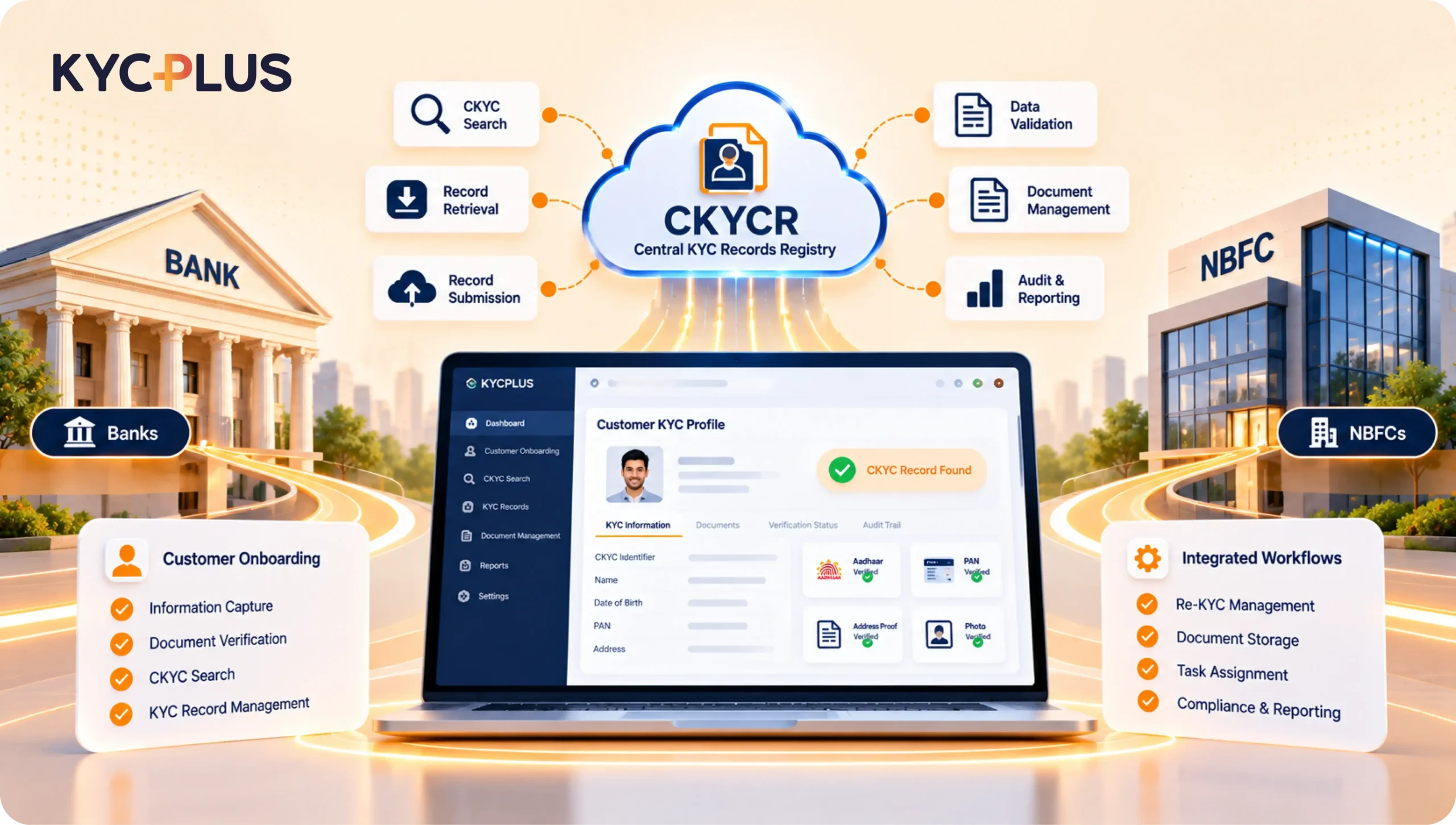
Customer identification and verification are essential for banks and Non-Banking Financial Companies (NBFCs). Before providing financial services, institutions must collect and verify the required customer information, maintain relevant records, and follow applicable KYC requirements. Traditionally, these activities involved physical documents, manual data entry, repeated verification, and coordination between branch employees and back-office teams. These processes can become time-consuming when institutions handle large numbers of customers across multiple branches or digital channels. As financial services become increasingly digital, financial institutions need efficient methods to manage customer information and verification workflows. Central Know Your Customer (CKYC) supports a centralized framework for maintaining customer KYC records through the Central KYC Records Registry (CKYCR), subject to applicable requirements and authorized access. This is where CKYC software for NBFCs & banks becomes valuable. A suitable platform can help organize customer onboarding, document collection, CKYC search and retrieval workflows, record preparation, and status tracking.
Instead of managing these activities across spreadsheets, physical files, and disconnected applications, institutions can use structured digital workflows to improve visibility and reduce repetitive administrative work.
However, CKYC software is not simply a document storage tool. Financial institutions must consider data accuracy, system integration, information security, audit trails, employee responsibilities, and regulatory requirements.
This guide explains CKYC software, its benefits, important features, implementation considerations, and how banks and NBFCs can select an appropriate solution.
Central Know Your Customer, commonly known as CKYC, is a centralized framework that allows eligible and authorized financial institutions to access and manage customer KYC records through the Central KYC Records Registry.
The framework aims to reduce unnecessary repetition in customer identification and support more consistent management of KYC information.
During customer onboarding, financial institutions may need to collect identity information, address details, photographs, and other supporting documents. The institution verifies the relevant information and maintains the records required for its business relationship with the customer.
Where an eligible customer already has a CKYC record, an authorized institution may be able to retrieve and use the available information in accordance with applicable requirements. If the information is incomplete or outdated, additional verification or updating may be necessary.
An existing CKYC record does not automatically satisfy every KYC obligation. Institutions must determine whether the record is appropriate for the specific customer, product, and transaction.
CKYC can support financial institutions in several ways:
The actual benefits depend on the institution’s processes, software capabilities, data quality, and integration arrangements.
CKYC software for NBFCs & banks is technology designed to support CKYC-related operations and customer KYC workflows.
Depending on the product and configuration, the software may support customer information collection, document uploads, OCR-based data extraction, CKYC search and retrieval workflows, record preparation, authorized submission processes, status tracking, and reporting.
For example, an NBFC processing personal loans may need to collect customer documents, verify information, check for an existing CKYC record, and prepare the application for further processing.
Without an integrated platform, employees may complete these tasks through multiple applications and manually transfer information between systems.
A digital platform can organize the process into defined stages. It can flag missing fields, support document verification, assign cases to authorized employees, and show whether an application is pending, under review, or completed.
Not all CKYC Solution Providers in India offer the same functionality. Some focus on specific CKYC operations, while broader digital KYC platforms may include onboarding, document management, Re-KYC workflows, OCR, and integration with financial applications.
Institutions should therefore evaluate the actual capabilities of the software rather than relying only on its product name.
Basic KYC software may focus primarily on collecting and verifying customer identity information.
CKYC-oriented software can provide additional capabilities related to authorized CKYC search, retrieval, record preparation, and associated processing workflows.
A broader digital KYC solution may also include:
The appropriate choice depends on whether the institution needs a specialized CKYC tool or a broader platform for managing its KYC operations.
Banks manage a wide range of customer relationships, including savings accounts, current accounts, deposits, and loans. Each relationship may involve specific onboarding, verification, and record-maintenance requirements.
When these activities depend heavily on manual work, banks may experience delays, incomplete applications, inconsistent information, and repeated administrative effort.
CKYC software for NBFCs & banks can help banks organize their workflows and improve visibility across branches and centralized processing teams.
Banks may process large numbers of applications through branches, websites, mobile applications, and other authorized channels.
Manual processing can create bottlenecks when employees repeatedly enter information, review documents, and update application statuses.
Digital workflows can standardize document checklists, identify missing fields, and route cases to the appropriate teams.
For example, a branch employee may initiate an onboarding case and upload the required documents. A centralized team can then review the information and resolve exceptions through a defined process.
Bank employees handle many responsibilities beyond KYC processing. Repetitive data entry and document handling can reduce the time available for customer service.
OCR and workflow automation can help reduce some administrative tasks. Employees can review extracted information and focus on incomplete or inconsistent cases instead of manually entering every detail.
Automated checks should support, rather than replace, necessary human verification.
Customers may become frustrated when they are asked to submit the same documents repeatedly or when an application remains pending without a clear explanation.
A structured digital workflow can make document requirements clearer and help employees identify missing information earlier.
Status tracking can also improve communication between branches, back-office teams, and customers.
Banks increasingly provide digital and assisted-digital services. CKYC-related workflows can form part of these journeys were permitted and technically supported.
A customer may submit information digitally, after which the system initiates the relevant verification and CKYC process. The institution must still follow the requirements applicable to its customer and financial product.
NBFCs provide services such as personal loans, vehicle finance, business loans, consumer finance, and equipment finance.
Their onboarding processes may involve branches, field officers, dealers, digital applications, and business partners. Managing customer information consistently across these channels can be challenging.
CKYC software for NBFCs & banks can help NBFCs organize customer verification and document workflows while supporting integration with their lending systems.
Loan applications may require identity documents, address information, income records, business details, and other supporting documents.
When employees repeatedly enter the same information into multiple systems, processing can become slower and more error prone.
A digital KYC platform can help collect information, extract data from supported documents, validate required fields, and support applicable CKYC-related workflows.
This can reduce administrative effort, although it does not replace credit assessment, underwriting, or other required checks.
Some NBFCs rely on field officers to collect documents and initiate applications.
A mobile-friendly interface can help field employees upload documents and follow a standard checklist. Centralized reviewers can then check the submitted information and identify incomplete cases.
Institutions should also consider device security, connectivity, access restrictions, and safe handling of customer information.
Different loan products may require different document sets and approval stages.
A configurable workflow can help an NBFC maintain common KYC controls while adapting the process to specific products.
For example, a vehicle finance application may require different supporting documents from an unsecured personal loan application.
As an NBFC expands its customer base, the volume of applications and documents may increase.
Automation can help standardize repetitive tasks and improve visibility into pending cases. Institutions should measure actual results through processing time, error rates, rework, and cost per completed application.
When evaluating CKYC software for NBFCs & banks, institutions should assess whether the available features address their actual operational requirements.
The software should support the relevant CKYC search and retrieval workflows where these functions are available and authorized.
Institutions should verify how searches are initiated, how possible matches are presented, and how unsuccessful or inconclusive results are handled.
They should also confirm the integration method, authorization requirements, and external dependencies.
Some CKYC workflows require institutions to prepare or update customer records.
Software can help organize required fields, validate information, identify missing documents, and support authorized submission processes where available.
Ask the vendor how the platform handles rejected records, corrections, and resubmissions. Do not assume direct registry integration unless the vendor can demonstrate the actual arrangement.
Optical Character Recognition (OCR) converts text from supported documents into machine-readable information.
In a KYC workflow, OCR may extract names, document numbers, dates, and addresses.
Employees can review the extracted information before proceeding. OCR accuracy depends on image quality, document type, language, and other factors, so unclear results should be flagged for review.
A document management system can help institutions store, organize, search, and retrieve customer records.
Useful features may include document classification, searchable metadata, version tracking, access permissions, and retention controls.
A secure repository can reduce dependence on physical files and unorganized folders.
Digital onboarding organizes customer information collection from the beginning of an application.
Depending on the solution, it may support customer data entry, document uploads, form validation, approval workflows, and application status tracking.
This can help employees identify missing information before an application moves to the next stage.
Re-KYC solution workflows help institutions organize customer information reviews and updates.
A suitable platform may support reminders, task assignments, document collection, approval processes, and reporting on incomplete cases.
Review schedules and workflows must be configured according to applicable requirements and institutional policies.
Workflow automation defines how an application moves from one stage to another.
For example, a case may move from document collection to verification, review, approval, and the next authorized processing stage.
The system should also manage exceptions. Missing information or unresolved discrepancies should not be ignored simply because an application has reached a particular stage.
Audit trails can record relevant user actions, timestamps, approval events, and workflow changes.
Reports can help managers monitor pending cases, completed applications, rejected records, processing times, and workload across branches.
Reporting should be supported by clear definitions and appropriate access restrictions.
Different employees need different levels of access to customer information.
Role-based permissions can help ensure that users access only the functions and records required for their responsibilities.
Institutions should also review privileged access, employee transfers, account deactivation, and logging of sensitive activities.
Integration is an important consideration when selecting CKYC software for NBFCs & banks.
Banks may need connections with Core Banking Solutions (CBS), while NBFCs may require integration with Loan Origination Systems (LOS), Loan Management Systems (LMS), CRM applications, and document repositories.
The institution should verify API availability, authentication, encryption, error handling, monitoring, and data reconciliation.
The exact process depends on the financial institution, product, software configuration, and applicable requirements. A typical workflow may include the following stages.
The process starts when a customer applies for an account, loan, or another financial service.
The application may be initiated at a branch, through a digital channel, or by an authorized field employee.
The customer or employee provides the required details and supporting documents.
The platform can use mandatory fields and document checklists to identify incomplete applications.
Where supported, OCR extracts information from documents. Validation rules can identify missing fields or inconsistent values.
Uncertain results should be reviewed by an authorized employee.
Where appropriate and authorized, the institution initiates a CKYC search.
If an eligible record is available, the institution may retrieve and use it according to the applicable requirements. If no suitable record is found, another process may be required.
The institution reviews the available information to confirm that it relates to the correct customer and meets the requirements for the intended purpose.
Additional information or verification may be necessary.
If a new record, update, or other action is required, the software can help prepare the information and supporting documents.
Where authorized submission or integration is supported, the workflow can continue through the configured connection.
The platform can show whether a case is pending, under review, completed, rejected, or awaiting additional information.
Clear status information helps employees identify the next action.
Relevant records can be stored and retrieved according to the institution’s policies and applicable obligations.
Audit trails and access controls help support accountability and traceability.
Core Banking Solutions and CKYC software serve different but complementary purposes.
CBS generally supports core financial activities such as accounts, deposits, transactions, and other banking operations.
CKYC software focuses on customer KYC workflows, document handling, verification support, record processing, and associated reporting.
A bank may already have a capable CBS but still need a specialized platform to manage digital onboarding and KYC-related activities.
For example, employees may need to collect documents, validate information, check CKYC availability, and route cases for review before an account is created in CBS.
A specialized platform can organize these activities and exchange approved information with the existing system.
Generally, CKYC software should not be considered a replacement for CBS. The systems have different purposes.
Similarly, an NBFC may continue using its LOS and LMS for lending operations while a digital KYC platform supports customer verification and document workflows.
The best architecture depends on the institution’s existing systems and business requirements.
OCR, validation rules, and automated workflows can reduce repetitive data entry and document handling.
Employees can focus more on exceptions and tasks that require judgment.
Clear document requirements and status tracking can reduce unnecessary follow-ups and improve communication.
Customers should still have access to assisted support when needed.
Dashboards can help managers identify pending applications, processing delays, and recurring errors.
This information can support better workload allocation and process improvement.
A common workflow can standardize document checklists, mandatory fields, and approval stages across branches.
Different products can still have their own requirements where necessary.
Structured electronic storage can help authorized employees locate relevant documents without searching through physical files or unorganized folders.
Organized records and audit trails can make it easier to review how an application was processed.
The usefulness of these controls depends on accurate configuration and complete records.
A configurable platform can help institutions maintain consistent workflows as customer volumes, branches, and products expand.
Scalability, system performance, and support arrangements should be evaluated before deployment.
Choosing a platform requires an assessment of business requirements, technical compatibility, security, implementation effort, and long-term costs.
Map the existing process and identify where delays occur.
Common challenges include repetitive data entry, incomplete applications, document retrieval problems, limited visibility into pending cases, and disconnected systems.
Use these findings to define the required features.
Ask the vendor to demonstrate the actual CKYC search, retrieval, record preparation, and processing functions available.
Clarify which activities require external services, separate permissions, or manual intervention.
List all applications that must exchange information with the proposed platform.
Discuss API availability, data formats, authentication, error handling, monitoring, and reconciliation.
Evaluate encryption, access management, audit logging, backup procedures, incident response, and data retention controls.
Ask for evidence of implemented safeguards rather than relying on general marketing claims.
Confirm that the platform can support expected workloads, simultaneous users, document uploads, and peak processing periods.
Performance testing should reflect the institution’s actual operating conditions.
Clarify support hours, escalation procedures, software updates, integration assistance, and service commitments.
The institution should understand how technical problems will be handled after deployment.
Costs may include licensing, implementation, customization, integrations, infrastructure, training, support, and upgrades.
Compare total ownership costs rather than focusing only on the initial price.
Existing customer records may contain missing, outdated, or inconsistent information.
Institutions should establish validation rules and a process for resolving discrepancies before migrating or exchanging data.
Blurred images and incomplete scans can affect OCR and document processing.
Clear upload instructions and appropriate quality checks can help reduce these problems.
System connections can fail because of connectivity issues, authentication errors, or incompatible data formats.
Monitoring, logging, retry mechanisms, and reconciliation can help identify and resolve failures.
Employees may struggle with a new platform if training is insufficient.
Practical training should cover daily workflows, exception handling, access permissions, and safe customer information management.
Multiple departments may participate in KYC processing.
Institutions should define who collects documents, reviews information, approves changes, and resolves technical issues.
A phased approach helps institutions test the platform before introducing it across the organization.
Document current workflows, identify process gaps, and define measurable objectives.
Include operations, compliance, IT, security, and relevant business teams.
Define integrations, data ownership, user permissions, workflows, and exception-handling procedures.
Security, performance, and recovery requirements should be included in the design.
Configure workflows, validation rules, dashboards, and user roles.
Test both successful cases and exceptions, including incomplete documents, inconsistent data, rejected records, and integration failures.
Start with selected branches, one product, or a limited group of users.
Measure processing time, incomplete cases, errors, and user feedback.
Train employees according to their responsibilities and expand the platform in manageable stages.
Provide clear escalation procedures for operational and technical issues.
Monitor performance, review access permissions, maintain integrations, and update workflows when business processes or applicable requirements change.
Financial institutions should evaluate software based on measurable operational results.
Important metrics include average processing time, manual effort, error rates, repeated document requests, cost per completed case, and the number of pending applications.
For example, suppose an institution processes 10,000 KYC-related cases each month and saves an average of four minutes per case through automation.
This would represent 40,000 minutes saved, or approximately 667 hours per month.
This is only an illustration. Actual savings depend on the process, software configuration, exception rates, and the extent to which employees can reduce repetitive work.
The institution should compare verified benefits with implementation and recurring costs before determining the return on investment.
KYC records can contain sensitive personal and financial information. Protecting this information should be a priority when evaluating CKYC software for NBFCs & banks.
Institutions should understand where data is stored, how it is transmitted, and who can access it.
The vendor should explain encryption, access controls, monitoring, backup arrangements, and incident response procedures.
Access should be limited to employees with legitimate business responsibilities.
Privileged accounts require additional attention, and permissions should be reviewed when employees change roles or leave the organization.
Relevant actions should be traceable according to institutional requirements.
The institution should confirm which events are logged, how logs are protected, and how long they are retained.
Banks and NBFCs must follow the requirements applicable to their regulatory category, products, and activities.
Software can support compliance processes, but purchasing a platform does not automatically make an institution compliant. The institution remains responsible for policies, controls, staff training, and ongoing oversight.
The institution should understand how the platform handles outages, integration failures, and other disruptions.
Backup and recovery procedures, incident escalation, and contingency workflows should be defined before deployment.
Financial institutions evaluating CKYC software for NBFCs & banks may also consider digital KYC platforms that combine onboarding, document processing, verification, and workflow management.
KYCPLUS, a digital KYC solution from Azlogics, can be evaluated by institutions looking to organize customer onboarding and KYC-related operations within a structured technology environment.
Depending on the selected modules and configuration, relevant capabilities may include document collection, OCR-based data extraction, workflow automation, document management, dashboards, verification integrations, and connections with existing financial systems.
Institutions requiring CKYC-specific functions should confirm the available search, retrieval, record-processing, and integration capabilities during a product demonstration.
Many banks and NBFCs have already invested in CBS, LOS, LMS, and other applications.
A complementary digital KYC platform can help address specific workflow gaps while allowing these systems to continue handling their primary functions.
For example, a bank may continue using CBS for core banking operations while a specialized platform supports document collection and KYC workflows.
An NBFC may use its LOS for loan origination while the KYC platform supports customer information collection and relevant verification activities.
The appropriate configuration depends on the institution’s requirements and technical environment.
Before choosing KYCPLUS or any alternative, institutions should ask:
A practical demonstration using representative scenarios can help decisionmakers assess whether the solution meets their requirements.
Financial institutions may continue automating repetitive tasks across onboarding, verification, and record management.
Routine activities can be handled through configured rules, while unusual cases are routed to authorized reviewers.
OCR and document-processing technology can improve information extraction and document classification.
However, automated results should still be reviewed where accuracy is uncertain, or the decision has important consequences.
Integration among onboarding applications, core financial systems, document repositories, and customer service platforms can reduce repeated data entry.
Strong authentication, monitoring, and clearly defined data ownership remain essential.
A low-cost platform may lack important features or require expensive customization.
Compare total ownership costs and confirm which capabilities are included.
Not every platform supports every registry-related operation.
Verify the precise functions, dependencies, and authorization arrangements.
A platform that does not integrate effectively with existing applications may create additional manual work.
Integration requirements should be assessed early.
Insufficient training can result in incorrect data entry, delays, and poor user adoption.
Provide practical guidance for daily tasks and exceptions.
Define baseline performance metrics before implementation.
Review processing time, error rates, incomplete applications, and operational costs after deployment.
Software supports compliance processes but cannot replace institutional responsibility, appropriate verification, or regulatory oversight.
Different institutions need different software configurations.
Banks may prioritize multi-branch operations, centralized processing, CBS integration, access control, auditability, and scalable workflows.
Urban Cooperative Banks may need to modernize document management and KYC workflows while retaining their existing banking infrastructure.
Compatibility, staff training, branch operations, and implementation costs should be evaluated carefully.
DCCBs may benefit from centralized monitoring and standardized workflows across branches.
The appropriate solution depends on the institution’s systems, operational structure, and reporting requirements.
NBFCs may prioritize integration with LOS and LMS platforms, digital document capture, mobile-friendly workflows, and support for different lending products.
Institutions using field teams may need simple document-upload processes, centralized review, and strong controls over mobile devices and customer information.
Fintechs may require API-driven workflows and connections with authorized verification providers.
Integration reliability, monitoring, and appropriate use of customer information should be central to the evaluation.
A product demonstration should show how the software handles real operational situations.
Ask the vendor to demonstrate a complete application, an application with missing documents, and a case with inconsistent information.
Check how the system identifies problems, assigns the next action, records the outcome, and supports resolution.
Important questions include:
A clear demonstration helps the institution understand both the capabilities and limitations of the proposed solution.
Successful implementation requires preparation across business and technology teams.
Start by establishing a project team with representatives from operations, compliance, IT, security, and the business units that will use the platform.
Document existing workflows and identify the problems automation should solve. Assess data quality before migrating or exchanging information between systems.
Define responsibilities for document collection, verification, approval, exception handling, and access management.
Prepare training materials and test the system with realistic cases before wider deployment.
During the pilot, monitor incomplete applications, processing time, integration errors, and user feedback.
After deployment, maintain a process for reviewing permissions, monitoring integrations, updating workflows, and evaluating performance.
Preparation helps ensure that the software becomes part of a reliable operating process rather than another disconnected application.
CKYC supports centralized KYC record management and can help reduce unnecessary repetition when existing records are available and can be used appropriately.
For financial institutions, the challenge is to manage customer information efficiently while maintaining accurate records, appropriate verification, secure document handling, and clear operational controls.
CKYC software for NBFCs & banks can support these objectives through structured workflows, OCR, document management, CKYC-related search and retrieval, reporting, and integration with existing financial systems.
However, the right solution is not necessarily the one with the longest feature list. Institutions should select software that addresses their actual operational gaps, integrates with existing applications, supports required controls, and remains manageable over time.
Before making a decision, evaluate the platform’s capabilities, integration requirements, security arrangements, implementation scope, and total cost of ownership. A phased pilot with measurable objectives can help validate the benefits before organization-wide deployment.
KYCPLUS can be considered as part of this evaluation when an institution is looking for a digital KYC platform to complement its existing banking or lending systems. The institution should confirm the relevant modules and CKYC-related capabilities during the evaluation.
Ultimately, successful CKYC automation combines appropriate technology with reliable processes, trained employees, secure integrations, and continuous oversight.
Ans: CKYC software for NBFCs & banks helps financial institutions organize CKYC-related activities, including customer information collection, authorized record search and retrieval workflows, document processing, validation, and status tracking.
Ans: Banks can use CKYC software to streamline KYC workflows, reduce repetitive data entry, improve document management, monitor pending cases, and maintain better records of processing activities.
Ans: Yes. Suitable software can support customer identification and CKYC-related workflows associated with loan applications. Integration with LOS or LMS may reduce repeated data entry.
Ans: No. An existing CKYC record does not automatically satisfy every verification requirement. Institutions must complete any additional checks applicable to the customer and product.
Ans: Important features may include authorized CKYC search and retrieval support, document management, OCR, validation, workflow automation, Re-KYC tracking, reporting, access controls, and system integration.
Ans: Many platforms support integration through APIs or other technical methods. Institutions should confirm compatibility, security, data ownership, and error-handling arrangements.
Ans: OCR extracts machine-readable information from supported documents, reducing manual data entry. Extracted information may still require validation and human review.
Ans: A suitable platform can help cooperative banks organize customer records and KYC workflows. Compatibility with existing systems, branch operations, security, and cost should be assessed.
Ans: Pricing depends on the features, user count, processing volume, integrations, implementation scope, infrastructure, and support arrangements. Institutions should request a detailed quotation.
Ans: Identify current process gaps, verify CKYC capabilities, assess integrations and security, compare total costs, and conduct a practical product demonstration. A limited pilot can help confirm whether the solution meets operational needs.
